


Meta-Frameworks
Keep your framework's routes and rendering, and add Void for databases, storage, jobs, and deployment. The guides in this section show how to connect each framework to Void.
Add voidPlugin() to the framework's Vite config. It detects resource usage, generates database types, manages migrations, and prepares the app for void deploy.
TanStack Start and React Router use the Cloudflare Vite plugin provided by Void. SvelteKit, Nuxt, Analog, and Astro use their own Cloudflare adapters. The setup differs, but your framework continues to handle routing and rendering.
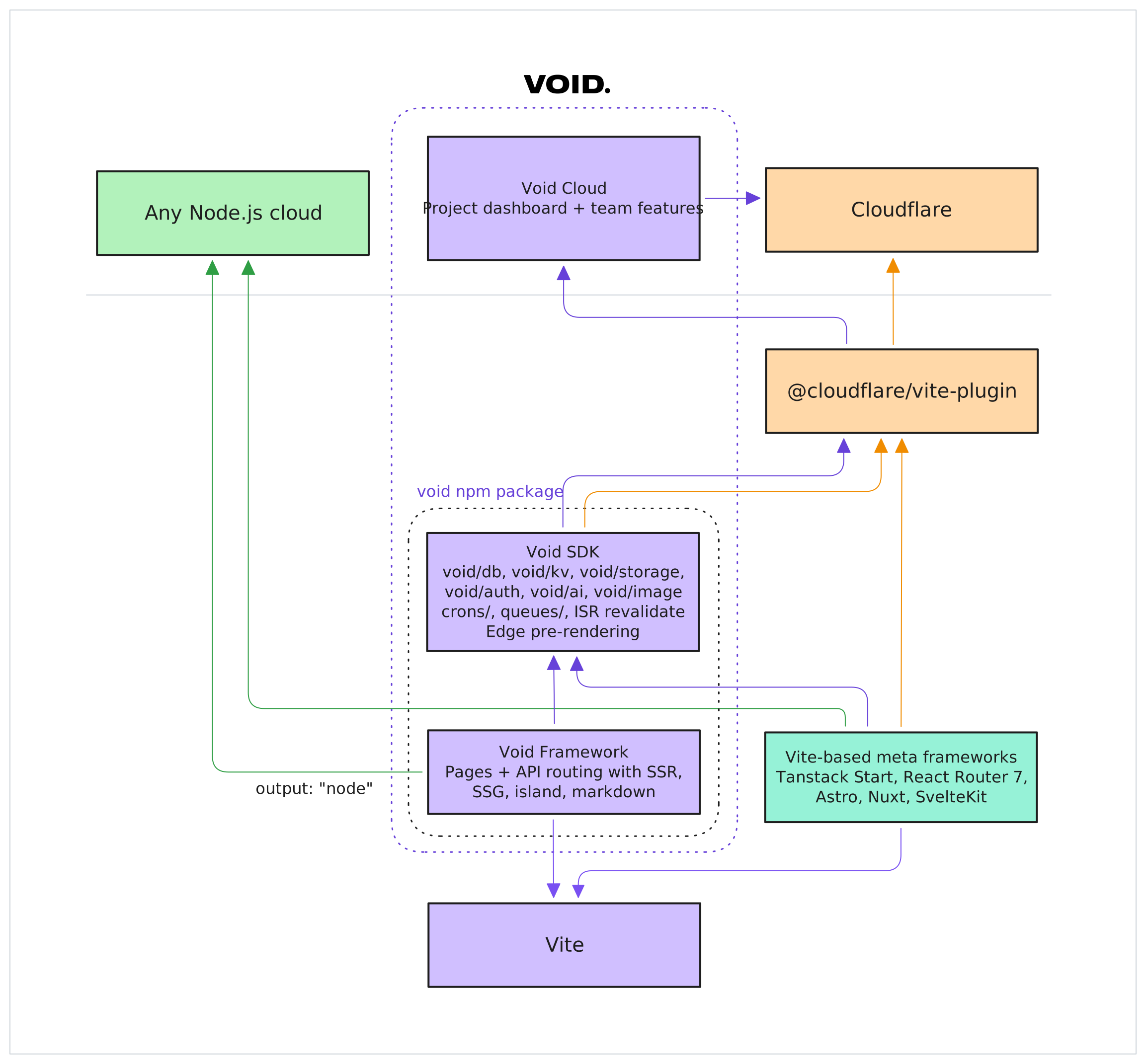
Supported Frameworks
| Framework | Package | Integration |
|---|---|---|
| TanStack Start | @tanstack/react-start | Vite plugin composition. voidPlugin() runs alongside the framework plugin. |
| React Router v7 | @react-router/dev | Vite plugin composition. Setup matches TanStack Start. |
| SvelteKit | @sveltejs/kit | Vite-based, uses its own Cloudflare adapter |
| Nuxt | nuxt | Own CLI and build toolchain |
| Analog | @analogjs/platform | Vite-based, uses Nitro with Cloudflare preset |
| Astro v6+ | astro | Own CLI and Cloudflare adapter (v6 required) |
Detection is automatic. The CLI reads your package.json dependencies.
See the individual framework guides for setup instructions:
Feature Support
With voidPlugin() added to the framework's Vite config, frameworks get most of the same backend/platform features as Void apps:
- Binding inference: D1, KV, R2, AI, and queues are detected from source code.
- Typed database: query helpers are generated from
db/migrations/*.sql. - Migrations: local D1 is updated on dev startup, and migrations are validated and deployed with
void deploy. - Runtime helpers:
void/db,void/kv,void/storage, andvoid/aigive you typed access to Cloudflare bindings in dev and production. - Auth: Void-managed auth is not supported in framework mode yet. For now, use Better Auth's official integration for your framework.
- Cron jobs: scheduled handlers via the
crons/directory. - Queue consumers: typed producers and consumers via the
queues/directory. - Revalidation and prerendering: configure them with
routing.revalidateandrouting.prerenderinvoid.json. Void apps can also set these per page in component files.
Frameworks can also access bindings directly via the framework's own mechanisms (e.g. platform.env in SvelteKit, event.context.cloudflare.env in Nuxt, env from cloudflare:workers in Analog, Astro.locals.runtime.env in Astro).
Configuration
void.json
Most configuration is inferred automatically. Use void.json to override defaults or fine-tune behavior:
{
  "$schema": "./node_modules/void/schema.json",
  "inference": {
    "build": "nuxt build",
    "scanDirs": ["src", "server", "lib"],
    "bindings": { "db": "MY_DB" }
  },
  "routing": {
    "prerender": ["/", "/about", "/pricing"],
    "revalidate": 60
  }
}| Field | Purpose |
|---|---|
inference.build | Override the default build command |
inference.scanDirs | Directories to scan for binding inference (defaults vary by framework) |
routing.prerender | Paths to prerender as static HTML at deploy time |
routing.revalidate | Default revalidation TTL in seconds for cached responses |
inference.bindings | Override inferred bindings. You only need this if auto-detection is not doing what you want. Accepts true or a custom binding name such as "db": "MY_DB". |
routing.notFound | Ignored. SvelteKit, Nuxt, Analog, and Astro pin not_found_handling to "none" — the framework worker owns unmatched HTML. void deploy warns if set. |
See Configuration for the full reference.
wrangler.jsonc
Frameworks that use Cloudflare's dev runtime for local dev (SvelteKit, Nuxt with nitro-cloudflare-dev, Astro) need a wrangler.jsonc for binding configuration. voidPlugin() auto-syncs inferred bindings into this file on dev startup:
{
  "name": "my-app",
  "compatibility_date": "2026-02-24",
  "compatibility_flags": ["nodejs_compat"],
  // Bindings below are auto-managed by voidPlugin()
}
Existing bindings are preserved. Only missing ones are added with local placeholder IDs.
For void deploy, compatibility settings are read from wrangler.jsonc automatically (no need to duplicate them in void.json).
Deploy Pipeline
SvelteKit, Nuxt, Analog, and Astro apps follow this pipeline:
void deploy
  │
  ├─ 1. Detect framework
  │    Reads package.json → determines framework + output conventions
  │
  ├─ 2. Build
  │    Runs framework's build command (or void.json `build` override)
  │    SvelteKit: vite build → .svelte-kit/cloudflare/
  │    Nuxt:      nuxt build → .output/
  │    Analog:    vite build → dist/analog/
  │    Astro:     astro build → dist/
  │
  ├─ 3. Analyze
  │    ├─ Locate worker entry + static assets from known output paths
  │    ├─ Infer bindings from source or read from void.json
  │    ├─ Collect migrations from db/migrations/*.sql
  │    ├─ Detect cron and queue handlers
  │    └─ Read wrangler.jsonc compat settings
  │
  ├─ 4. Wrap (if needed)
  │    If crons or queues are configured:
  │    ├─ Generate wrapper entry module
  │    ├─ Bundle with Vite (wraps framework's worker)
  │    └─ Wrapper adds scheduled/queue handlers
  │
  ├─ 5. Package + upload
  │    Same as full-stack: hash-based asset diffing,
  │    multipart upload, platform provisioning
  │
  └─ 6. Live
       https://my-app.void.app