


Type Safety
Void provides end-to-end type safety across the stack. Types come from your source code and Drizzle schema, so you are not hand-writing or duplicating interfaces.
The Type Pipeline
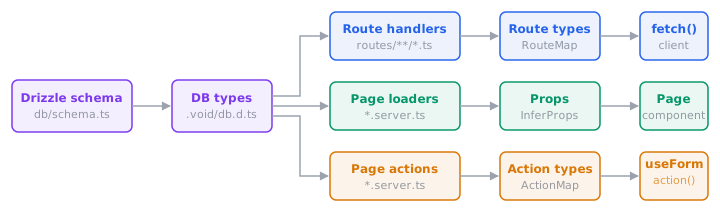
- Database types come from your Drizzle schema. Column types are known at compile time.
- Route handlers: return types and validator schemas become the generated
RouteMap, which the typed fetch client consumes. - Page loaders: return types flow into page components as props via
InferProps. - Page actions: validator schemas flow into
useFormandaction()for typed data, errors, and URL autocomplete.
All generated types live in .void/ and update automatically when source files or schema change.
Database → Handler → Client
Types flow from your Drizzle schema through handlers to the client without any manual annotations:
// routes/api/users.ts
export const GET = defineHandler(async (c) => {
  return db.select({ name: users.name, email: users.email }).from(users);
  //     ↑ return type inferred from schema columns
});

export const POST = defineHandler.withValidator({
  body: insertUserSchema, // ← derived from Drizzle schema
})(async (c, { body }) => {
  return db.insert(users).values(body).returning();
});// Client: types inferred from handlers above
const users = await fetch('/api/users');
// ↑ { name: string; email: string }[]
await fetch('/api/users', {
method: 'POST',
body: { name: 'Alice', email: 'alice@example.com' }, // ← typed from validator
});The Drizzle schema defines database columns, runtime validation, handler input types, and client-side type checking all at once. For endpoints that don't map to a table, use any Standard Schema library.
Loader → Page Props
In pages mode, a loader's return type flows into the page component via InferProps:
// pages/users/index.server.ts
export type Props = InferProps<typeof loader>;

export const loader = defineHandler(async (c) => {
  return { users: await db.select().from(users) };
});<!-- pages/users/index.vue -->
<script setup lang="ts">
import type { Props } from './index.server';
defineProps<Props>(); // ← { users: { id: number; name: string; ... }[] }
</script>No manual interface is needed. Props stay in sync with whatever the loader returns.
Action → useForm
When a page action uses withValidator(), the body schema flows through to useForm. That gives you typed data, typed errors keys, and URL autocomplete:
// pages/users/create.server.ts
export const action = defineHandler.withValidator({
  body: insertUserSchema,
})(async (c, { body }) => {
  await db.insert(users).values(body);
});const form = useForm('/users/create', { name: '', email: '' });
// ^ autocompletes ^ must match body schema
form.errors.email; // ✓ string | undefined
form.errors.foo; // ✗ TypeScript errorNamed actions work the same way. The ?actionName suffix selects the right types for that action:
const updateForm = useForm('/users/:id?update', { name: '' }, { params: { id } });
const deleteForm = useForm('/users/:id?delete', { id: '' }, { params: { id } });
// Each form's data and errors are typed from their respective validators
The action() helper gets the same type checking. See Actions & Forms for the full API.
What Gets Checked
| Layer | What's type-checked |
|---|---|
| Database | Table columns, value types, insert/update shapes from Drizzle schema |
| Handlers | c.env bindings, validator input, return type |
| Fetch client | Route paths, HTTP methods, body/query/params, response type |
useForm | Action URLs, data fields, errors keys, reset() args, params |
action() | Action URLs, data payload, params |
Serialization
Handler return types are transformed via Serialize<T> so the client sees what actually arrives over the wire:
| Source type | Serialized type |
|---|---|
string, number, boolean | unchanged |
Date | string |
Response | excluded (passed through at runtime) |
bigint, Function, undefined | excluded |
Array<T> / { key: T } | recursively serialized (function-valued keys stripped) |
Context Variables
Middleware and handlers share typed data through Hono's context variables. Augment CloudContextVariables to define your own:
// middleware/01.auth.ts
declare module 'void' {
  interface CloudContextVariables {
    requestId: string;
  }
}

export default defineMiddleware(async (c, next) => {
  c.set('requestId', crypto.randomUUID());
  await next();
});
Now c.get("requestId") returns string everywhere, with no assertion needed. Multiple augmentations across files are merged together.
Setup
Extend the generated tsconfig in your project:
{
  "extends": "./.void/tsconfig.json",
  "compilerOptions": {
    "target": "ES2022",
    "module": "ES2022",
    "moduleResolution": "bundler",
    "strict": true,
    "jsx": "react-jsx",
    "types": ["void/env"]
  },
  "include": ["src", "routes", "middleware", "crons", "queues"]
}
If your project already extends another config, use void init --tsconfig so Void can patch the file without dropping existing files or compilerOptions.paths entries. The resulting config may use TypeScript's multi-extends form:
{
  "extends": ["./tsconfig.base.json", "./.void/tsconfig.json"],
  "compilerOptions": {
    "types": ["void/env"]
  }
}
The .void/tsconfig.json uses "files" and compilerOptions.paths for generated declarations such as routes.d.ts, db.d.ts, and queues.d.ts. TypeScript inherits those fields, but files and paths are replaced rather than deeply merged when another config defines them. void init --tsconfig handles the common existing-config cases by adding Void's generated files and aliases directly to the root config when needed.
Run void prepare in CI or after a fresh clone, or let vite dev / vite build generate the .void/ files during normal app workflows.